PyFrame: GIF and Image Moderation
A smart GIF moderation tool supporting AWS Rekognition and local HuggingFace models. Reduces costs by 93% using temporal segmentation, or run entirely free with a two-pass approach.
PyFrame: GIF and Image Moderation
I just released PyFrame, a GIF and image moderation tool using AWS Rekognition or local HuggingFace models.
About
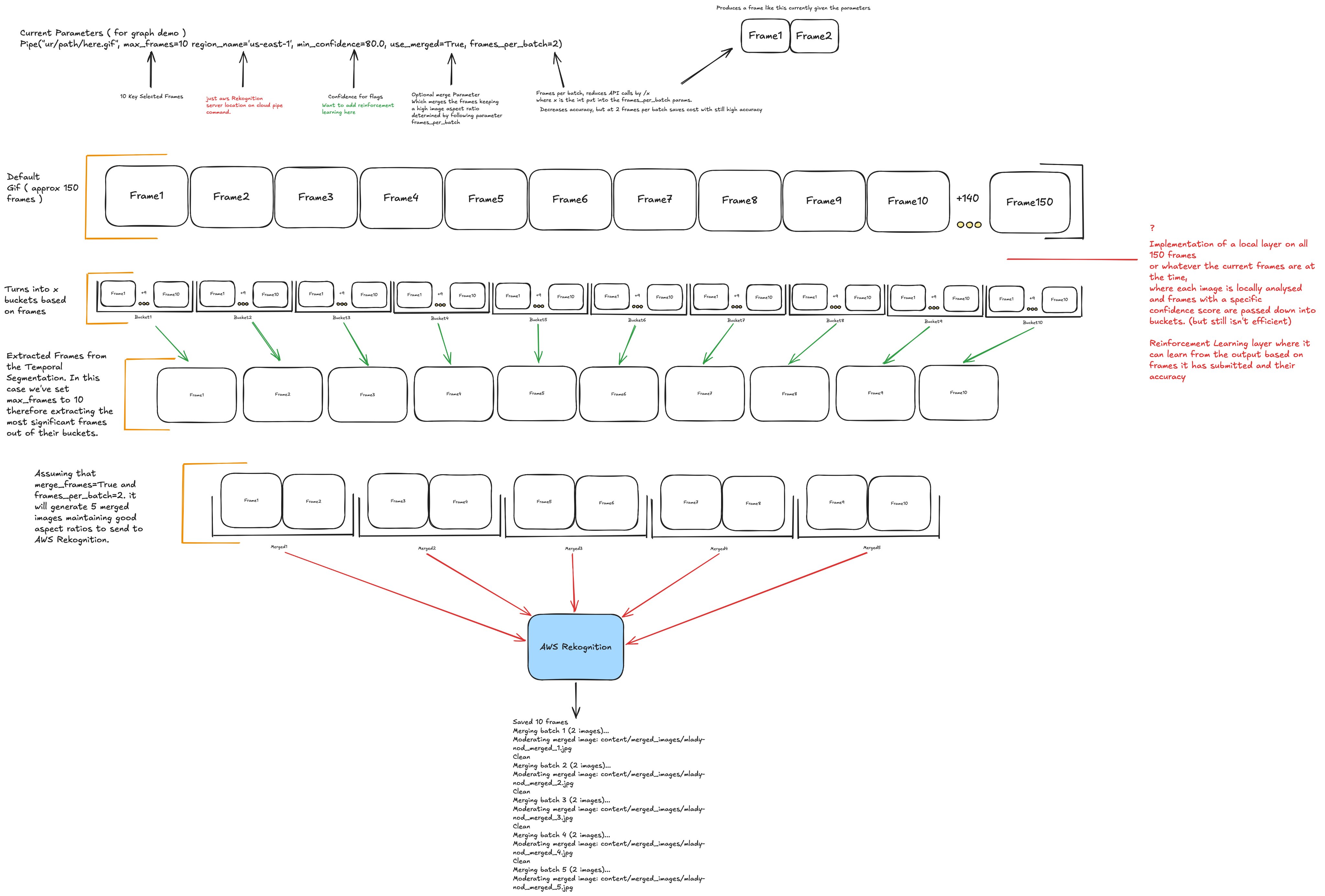
PyFrame utilises Temporal Segmentation to optimise moderation. Instead of processing every frame, the system divides the animation into equal time windows ("buckets") and calculates the inter-frame difference for each frame. It then applies motion-based keyframe selection to extract the single most significant frame from each bucket. This guarantees diverse scene coverage and captures peak motion events across the entire GIF. Supports both AWS Rekognition and local HuggingFace models for classification.
The Problem
AWS Rekognition charges $1.00 per 1,000 images processed. A typical 5-second GIF at 30 FPS contains 150 frames, costing $0.15 to moderate when processing every frame. At scale, this makes comprehensive moderation expensive fast.
How PyFrame Solves This
PyFrame analyses the same 150-frame GIF using just 10 intelligently selected frames, reducing the cost to $0.01 per GIF - a 93% saving while maintaining detection accuracy. Alternatively, run the same frame extraction with a local HuggingFace model for zero cost (less accuracy than AWS) but can utilise a two-pass approach optionally.
| Method | Frames Analysed per GIF | Cost per GIF | GIFs Moderated | Cost Savings |
|---|---|---|---|---|
| Standard Method (All Frames) | 150 frames | $0.15 | 66 GIFs | Baseline |
| PyFrame (10 Buckets) | 10 frames | $0.01 | 1,000 GIFs | 93% reduction |
Usage
Extract key frames from a GIF and moderate them with AWS Rekognition:
from lib.aws.pipe import Pipe

pipe = Pipe("content/gifs/your-gif.gif", max_frames=10, min_confidence=80.0)
results = pipe.run()
Options
max_frames- Number of frames to extract (default: 10)min_confidence- Minimum detection confidence (default: 80.0)use_merged- Merge frames before moderating (default: False)frames_per_batch- Frames per merged image (default: 2)
LocalPipe
Bring your own model from HuggingFace instead of using AWS. Runs entirely locally, no API keys or AWS config needed. Defaults to AdamCodd/vit-base-nsfw-detector but you can pass any HuggingFace image-classification model. Not as accurate as AWS Rekognition but works well as a free alternative.
from lib.local.local_pipe import LocalPipe

# default model
pipe = LocalPipe("content/gifs/your-gif.gif", max_frames=10)
results = pipe.run()

# custom model
pipe = LocalPipe("content/gifs/your-gif.gif", max_frames=10, model="Falconsai/nsfw_image_detection")
results = pipe.run()
Options
max_frames- Number of frames to extract (default: 5)model- HuggingFace model ID (default:AdamCodd/vit-base-nsfw-detector)use_merged- Merge frames before classifying (default: False)frames_per_batch- Frames per merged image (default: 2)
Two-Pass Approach
I'd suggest combining both pipelines for the best balance of cost and accuracy. Use LocalPipe as a fast, free first pass to screen content locally. If the local model flags something or returns a borderline confidence score, escalate those frames to AWS Rekognition for a definitive second pass. This way the majority of clearly safe content never hits AWS at all, and you only pay for the content that genuinely needs higher-accuracy classification. In practice this can cut your Rekognition bill dramatically while still catching edge cases that the local model might miss.
Setup
- Install dependencies:
pip install -r requirements.txt
- For LocalPipe, install the additional dependencies:
pip install transformers torch
- For AWS Rekognition, install the AWS CLI and configure credentials:
brew install awscli
aws configure
Run
source .venv/bin/activate && python main.py
Diagram
Structure
content/- All input/output fileslib/- Core functionalityaws/- AWS Rekognition pipelinepipe.py- Rekognition piperekognition_moderator.py- Rekognition API wrapper
local/- Local HuggingFace pipelinelocal_pipe.py- Local pipelocal_detector.py- HuggingFace model wrapper
frame_processor.py- Frame extractionimage_utils.py- Shared image helpersvideo_converter.py- Video to GIF conversion
Enjoyed this post? Leave a reaction.
Read next
Ideal CV K2C
Kent2Corporate's ATS-ready CV kit: download the proven DOCX template or compile the LaTeX resume live in-browser.
11/24/2025 • 4 min read
Hackathon/Project Booster (HBoost)
A toolkit to quickly set up and deploy projects from hackathons or personal projects designed to be scalable.
10/7/2025 • 5 min read